A loud notification can create a deadline faster than it creates evidence.
Notifications are designed to pull attention away from what you were doing. That makes them useful for a meeting reminder and tempting for anyone who wants a hurried decision. The safest response is not to dismiss every warning. It is to separate the feeling of urgency from the source, the requested action and the independent evidence that something really needs attention.
Let the evidence choose the action, not the volume of the alert.
The frame is not the author
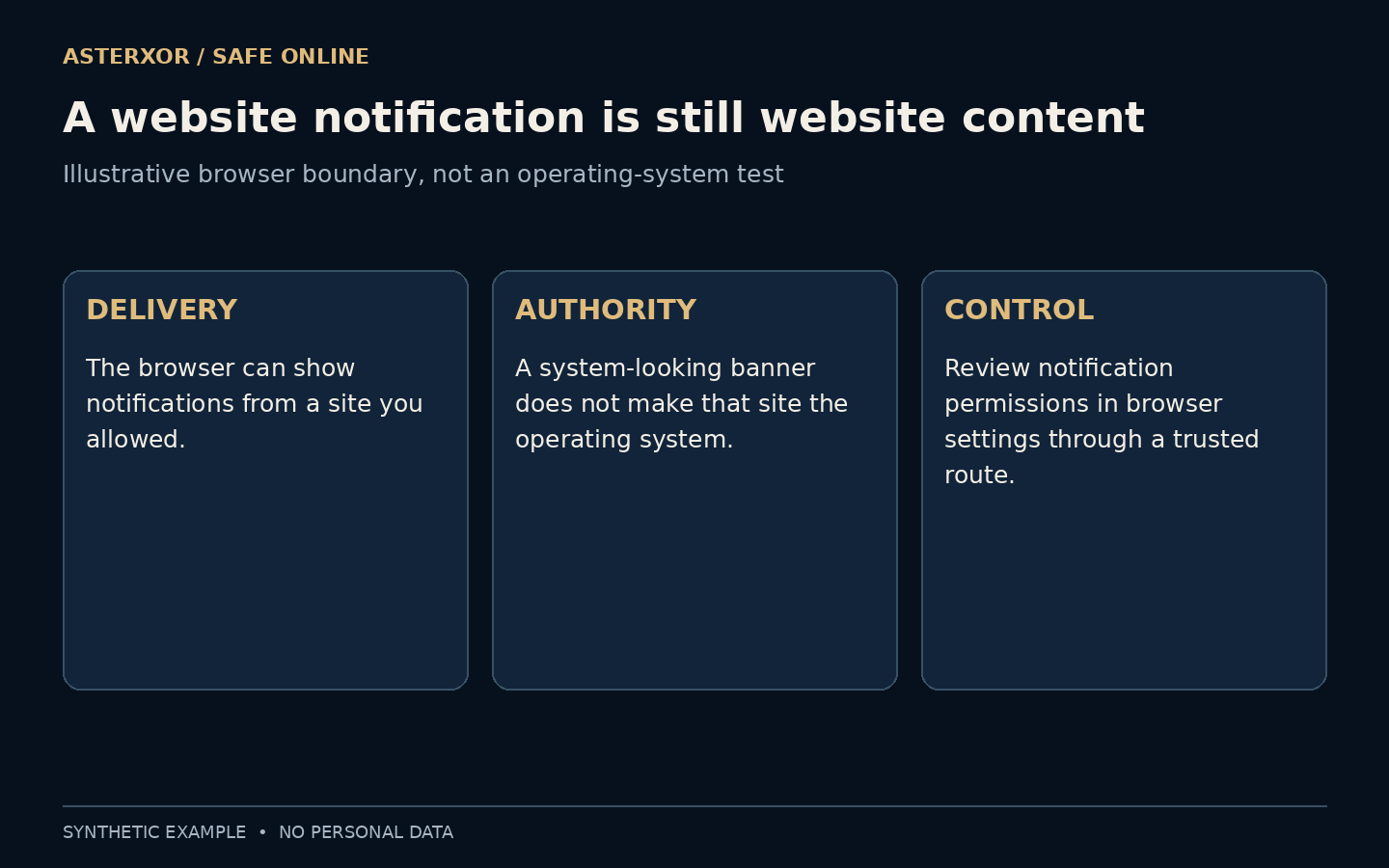
A browser can display notifications from websites, apps and extensions under its permission system. The presentation may look like part of the computer’s usual interface, but the words can still come from a website. A familiar position on the screen does not make a message an operating-system diagnosis or an instruction from your account provider.
Look for the actual source shown by the device or browser, and remember how the permission was granted. Even a recognizable source is only part of the story: a genuine account alert still needs to be interpreted in context. A website claiming to speak for the operating system deserves independent checking, not instant obedience.
Also distinguish the words inside an alert from the controls that surround it. A page can draw a button that looks like a system action, while the browser’s actual settings live elsewhere. You do not need to investigate by pressing the alarming button. Use a familiar device or browser control to leave the interruption, then navigate to settings independently if you need to review permissions.
Urgent and trustworthy are different axes
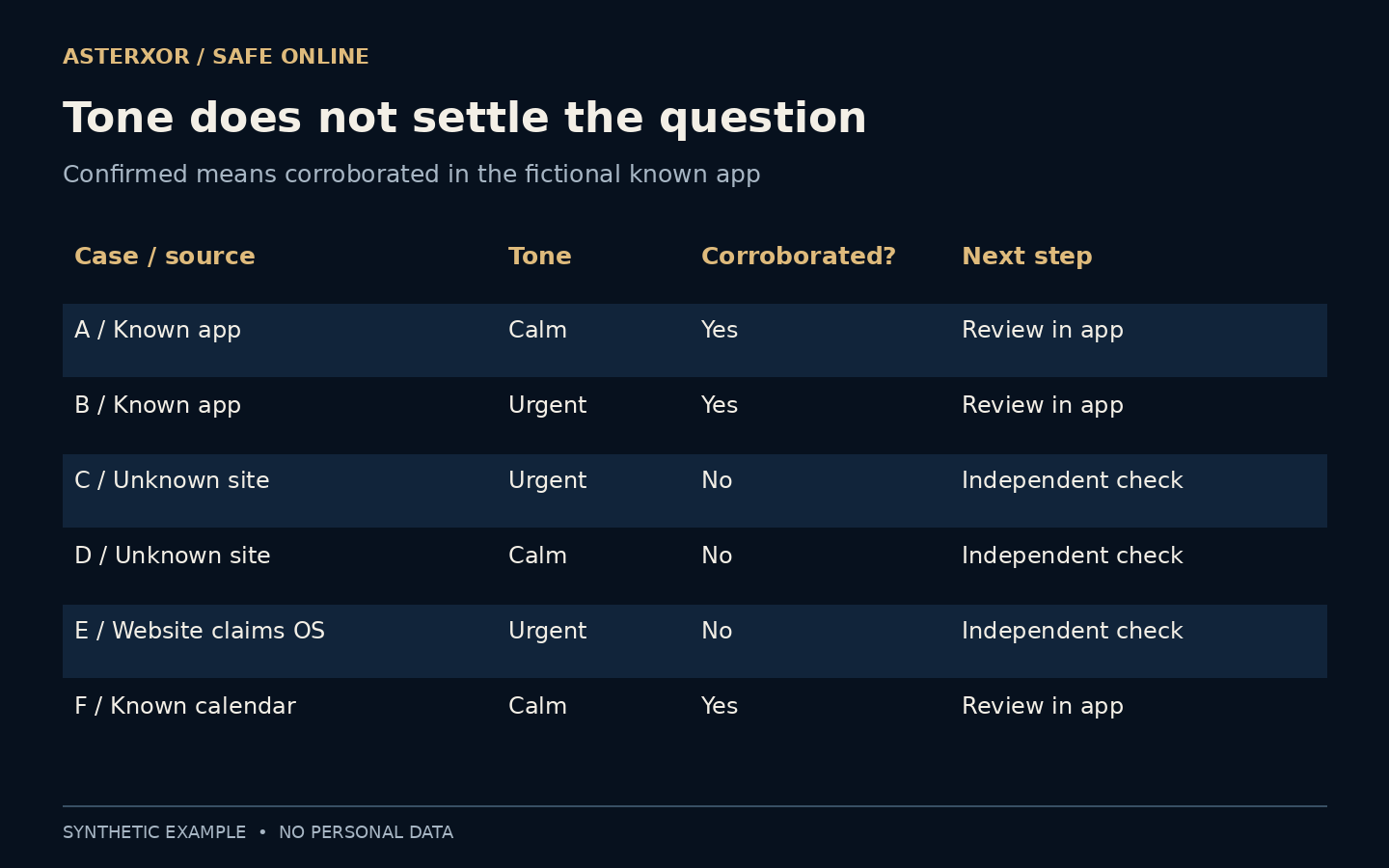
Our offline table contains six fictional alerts. Three are corroborated inside a known app, and three are not. One confirmed alert is urgent; another unconfirmed alert is calm. We deliberately included both combinations so a simple rule such as “urgent means fake” or “polite means safe” would not fit the examples.
For confirmed items, the table says to review the issue within the known app. For unconfirmed items, it says to check independently. The table records assumptions we supplied, not discoveries made by an automatic detector. Three out of six is a count of invented cases, not an estimate of how many real notifications are deceptive.
Independent corroboration should concern the same event, not merely a similar phrase. A real billing page may contain a routine balance without confirming an unexpected demand to change payment details. Match the account, requested action and relevant context. If they do not line up, treat the discrepancy as unresolved rather than borrowing legitimacy from any genuine page you can find.
What would the interruption make you do?
A request to read a calendar change has different consequences from a request to install software, grant remote access, reveal a code or send money. Before responding, name the action. This small pause moves attention from the alarming description to the actual decision you are being asked to make. Consequence matters more than how polished the banner looks.
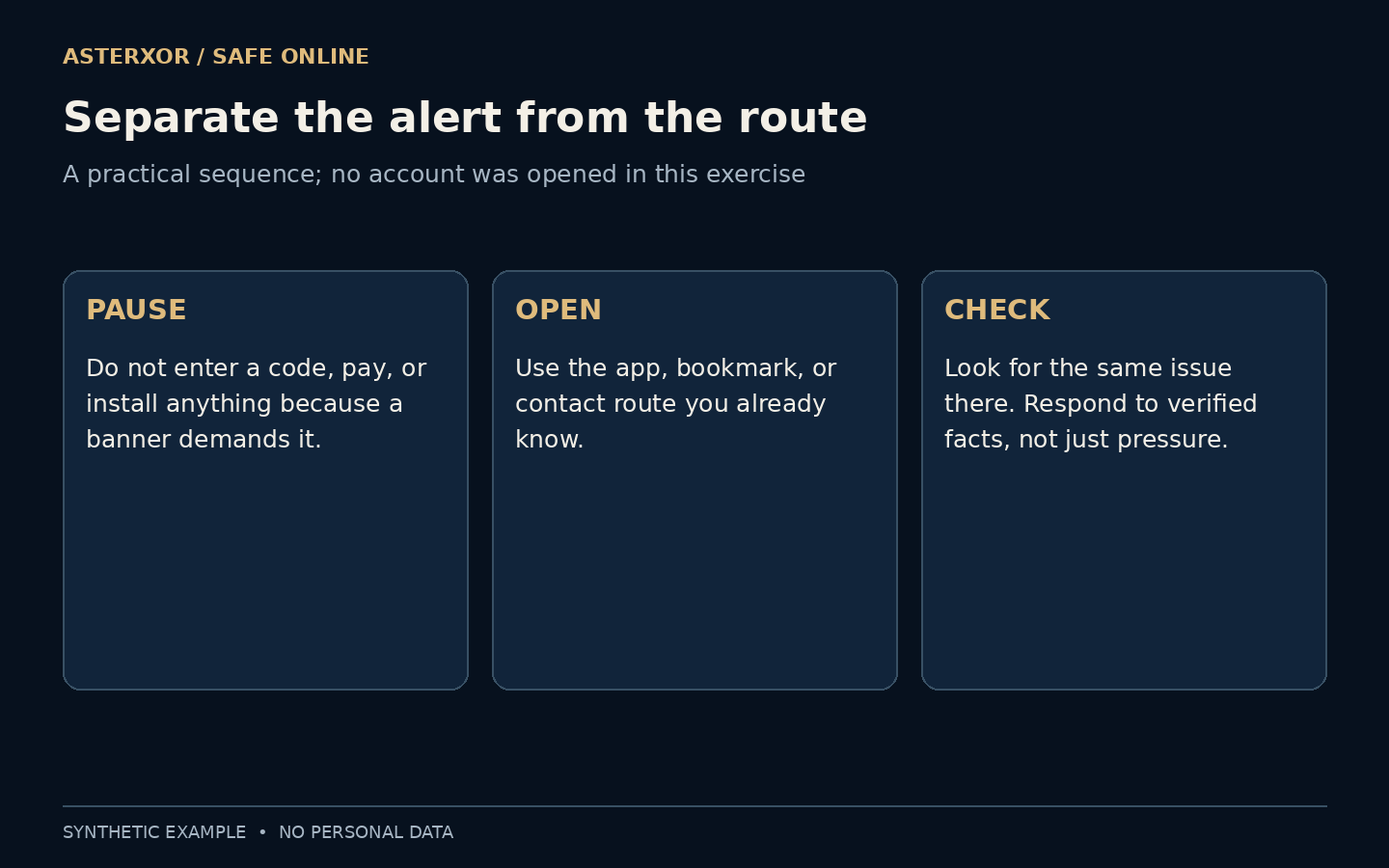
A countdown, threatening wording or repeated interruption can make checking feel like disobedience. You do not have to solve a technical mystery inside that pressure. Leave the notification and reach the service another way. A genuine issue can still be addressed promptly through a route whose origin you understand.
Before doing anything consequential, describe the request without its emotional language: install a program, approve a sign-in, disclose a value, or pay a recipient. That plain description can reveal a mismatch with the original task. Reading a parcel update, for example, should not silently become a decision to grant remote control. The observation is about the action’s scope, not a claim that every surprising request is fraudulent.
Check the claim away from the alert
Open the app or saved bookmark you already use, then look for the same issue in the relevant account area. If you need help, find contact details independently rather than using the number or link supplied by the interruption. The goal is to verify the underlying event, not to see whether the suspicious message can explain itself convincingly.
Do not enter a recovery code or password into a new page merely because the alert says it is urgent. If the known service shows a genuine problem, follow its supported process. If it does not, that discrepancy is a reason to investigate further, not an automatic guarantee that nothing happened. Some legitimate alerts may describe events not immediately visible in a dashboard.
Review the permission, not just the banner
If a website keeps sending unwanted notifications, review its notification permission through the browser’s settings. Blocking a source can stop that delivery channel; merely closing one banner may not. Chrome documents both default notification behavior and per-site controls, but interfaces and available choices differ between devices and browsers.
Permission to send a notification does not grant a website authority over the rest of your device. Likewise, turning notifications off does not repair an account that was already compromised or reverse a payment. Control the interruption separately from investigating any action you took. Our exercise changed no settings and made no claims about a particular browser installation.
If you block an unwanted notification source, make a separate note of any action already taken. Removing delivery permission can quiet the screen without changing an account password, ending a remote-control session or reversing a transaction. Conversely, an account can need attention even after no more alerts appear. A calmer interface is helpful, but it is not evidence that every consequence has been resolved.
An action inventory is more useful than a fear score
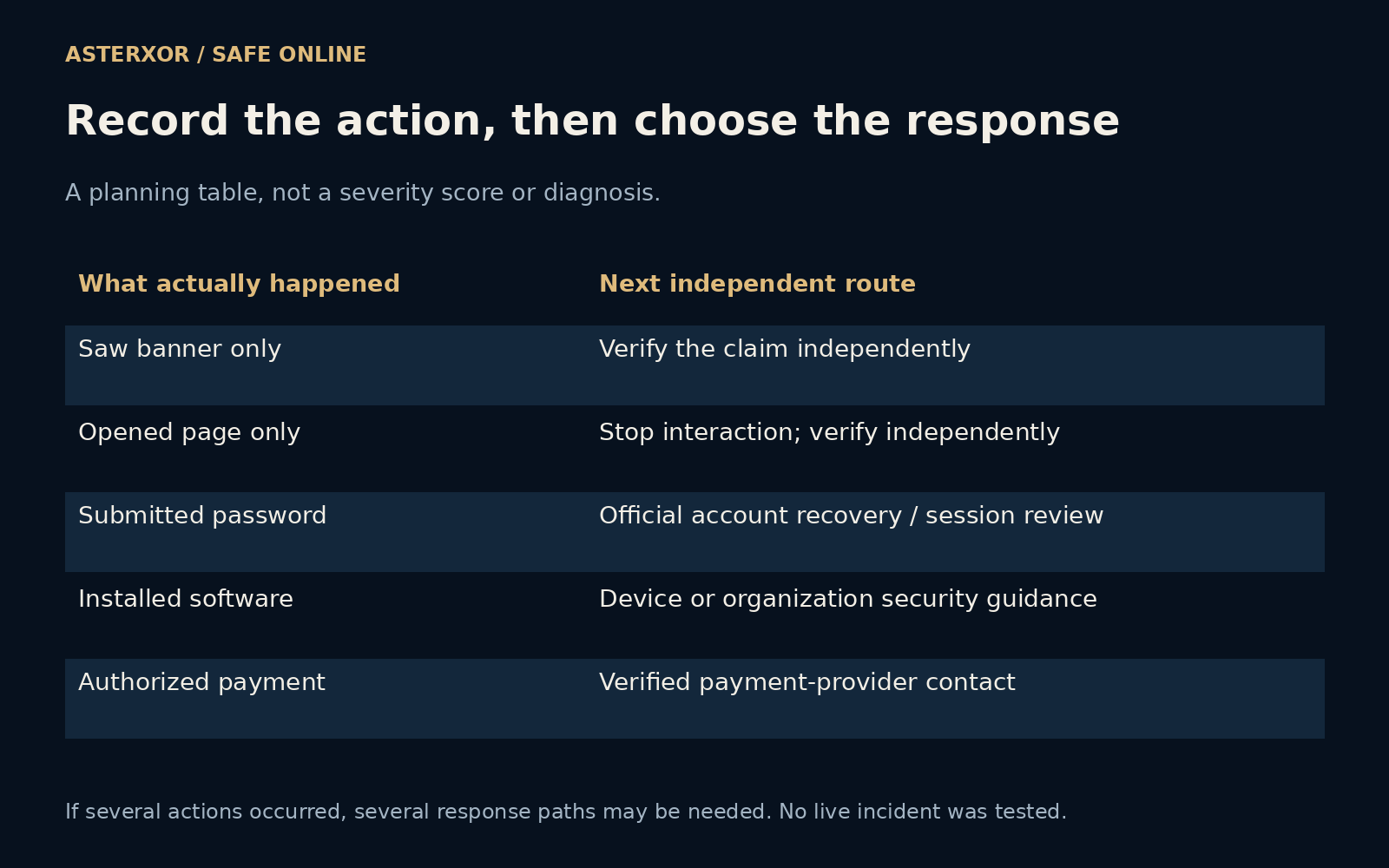
Our added planning table distinguishes seeing a banner, opening a page, submitting a password, installing software and authorizing a payment. These are neutral descriptions, not a ladder of measured risk. The table assigns an independent next route to each: verify the claim, stop page interaction, review the account, seek device guidance, or contact the payment provider through verified details.
The categories can overlap. Someone might both install an application and enter a password, so treating the event as only a mistaken click could omit a necessary response. Record the service involved and the action without copying passwords, codes or payment secrets into the note. If a workplace device or account is involved, its established support or security channel should be part of the response.
Seven new assertions check the map’s five distinct categories and its stated routing rules. They do not establish whether a real device contains malware or a real payment can be recovered. The map exists to make a conversation with legitimate support more precise. When uncertainty remains, say what you know happened and what you do not know, rather than turning a frightening description into an unsupported diagnosis.
If you already acted, describe the action
Clicking, entering a password, installing an application and authorizing a payment call for different responses. Stop further interaction and write down what actually happened without sharing secrets. Use the service’s independently reached recovery or support guidance. If money was involved, contact the payment provider promptly through verified details.
Do not let embarrassment become a second source of delay. A clear account of the action is more useful than deciding whether you were “fooled.” For future alerts, keep the habit small enough to remember: identify the source, name the requested action and check important claims by a route that the notification did not choose for you.
Further reading
Google Chrome Help: notification controls ↗FTC: recognizing and avoiding phishing ↗Original documentation and useful background.